- Python 100%
| Filename | Latest commit message | Latest commit date |
|---|---|---|
 Tim Stoop
7bcc7b1cf8
Tim Stoop
7bcc7b1cf8The previous fix only allowed removing devices the API wasn't currently reporting, which seemed right but wasn't: pyaltherma structurally reports a hot_water_tank unit for hydroboxes with no physical tank too, just with every field (model, indoor/outdoor software) coming back None. So "is this currently reported" can't tell a real tank apart from a non-existent one, and the Hot Water Tank device kept getting rejected for removal in practice. Simplify to unconditionally allowing removal, matching the common pattern for this callback -- a device that's still genuinely active (e.g. Space Heating) just gets recreated on the next reload. Co-Authored-By: Claude Sonnet 5 <noreply@anthropic.com> Claude-Session: https://claude.ai/code/session_01DFPAWNnt1a5dnQcGZR3jb3 |
||
| .github/workflows | ||
| custom_components/daikin_altherma | ||
| img | ||
| tests | ||
| .gitignore | ||
| hacs.json | ||
| LICENSE | ||
| pytest.ini | ||
| README.md | ||
| requirements_test.txt | ||
Daikin altherma custom component for Home assistant
This HA integration is for BRP069A62 (should work with BRP069A61) Daikin Altherma LAN adapter. Also, it has been successfully tested with D2CND with gateway DRGATEWAYAA.
The integration connects to device locally, thus internet connection is not required.
NOTE: This is a very early release, and comes without any guarantees. So, use it at your own risk.
Installation
You can install manually or by using HACS (the easier way).
HACS
- Go to
HACS > Integrations - Press
+ explore and & download repositories - Search for
Daikin Altherma
Manual installation
- Using the tool of choice open the directory (folder) for your HA configuration (where you find
configuration.yaml). - If you do not have a
custom_componentsdirectory (folder) there, you need to create it. - In the
custom_componentsdirectory (folder) create a new folder calleddaikin_altherma. - Download all the files from the
custom_components/daikin_altherma/directory (folder) in this repository. - Place the files you downloaded in the new directory (folder) you created.
- Restart Home Assistant
- It should automatically discover your adapter !
If device is not discovered automatically you can go to "Configuration" -> "Integrations" click "+" and search for "Daikin Altherma HVAC"
Features
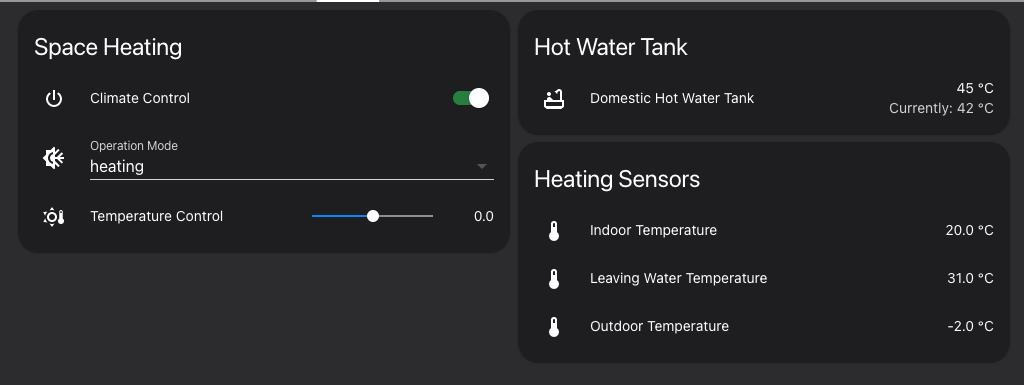
This integration allows to control the following options
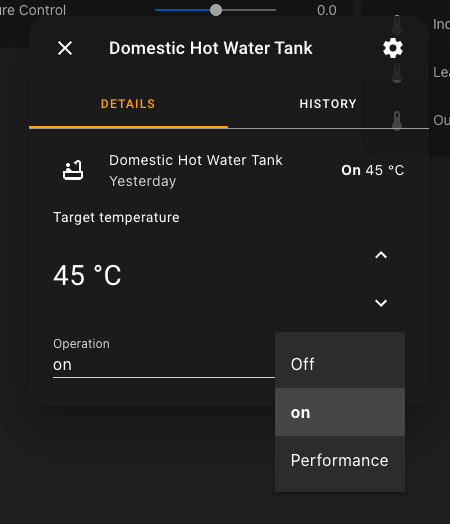
For water heating:
- Get/Set target temperature
- Get water temperature
- Turn off/on
- Turn powerful
For space heating:
- works with both states weather dependent and fixed
- Operation State (heating/cooling/auto)
- Leaving water temperature heating/cooling/auto (get/set)
- Leaving water temperature offset heating/cooling/auto (get/set)
- Indoor temperature
- Outdoor temperature
- Current leaving water temperature
- Turn on/off
- Operation mode
Screenshots

Climate control component
I do not own room thermostat, therefore I cannot properly test it. In this case I just control leaving water temperature. Daikin device allows to control leaving water temperature which is not what you expect your room temperature to be it is either higher or lower (if cooling is turned on). If you don't have thermostat you can use generic thermostat which comes with HA by default.
Put this into your configuration.yaml:
climate:
  - platform: generic_thermostat
    name: My Heater
    unique_id: daikin_climate_control
    target_sensor: sensor.indoor_temperature
    min_temp: 18
    max_temp: 26
    heater: switch.climate_control
    target_temp: 20
    cold_tolerance: 0.3
    hot_tolerance: 0.3
    ac_mode: false
    initial_hvac_mode: "heat"
    min_cycle_duration:
      seconds: 5
target_sensor can be any temperature sensor.